
Article
Read full insight

Site preparation checklist
Standard Operating Procedure (SOP) for Preparing a Space for Matterport 3D Scanning, 360 Photography, or Commercial Photoshoot
By following this checklist, clients can ensure a smooth and efficient 3D scanning, 360 photography, or commercial photoshoot process, resulting in high-quality digital assets that accurately represent the space
- General Preparation Guidelines
- Ensure the space is clean, tidy, and clutter-free.
- Remove any personal, confidential, or valuable items.
- Arrange furniture and décor to highlight key features.
- Replace any burnt-out light bulbs for consistent lighting.
- Secure or hide cables and wires for a neat appearance.
- Inform staff, residents, or occupants about the scheduled shoot to minimize disruptions.
- Lighting and Ambience
- Open curtains and blinds to allow natural light where possible.
- Turn on all indoor lights for consistent lighting.
- Avoid mixed lighting sources (e.g., warm and cool lights in the same space).
- Ensure external lights and signage are functional for exterior shots.
- Interior Spaces
- Living Rooms & Offices: Arrange furniture neatly and remove unnecessary items.
- Bedrooms & Private Spaces: Beds should be made, and personal items should be minimized.
- Kitchens & Pantries: Clear countertops, remove dish racks, and organize shelves.
- Bathrooms & Restrooms: Ensure surfaces are clean, toiletries are neatly arranged, and toilet lids are closed.
- Conference Rooms & Workspaces: Organize chairs, declutter desks, and remove excessive branding materials unless required.
- Mirrors & Reflective Surfaces: Position tall plants or other objects in front of mirrors to minimize camera reflections.
- Electronics: Turn off televisions or display a static logo if necessary.
- Exterior & Outdoor Areas
- Ensure landscaping is well-maintained (trimmed grass, cleaned pathways, and no visible trash).
- Remove unnecessary objects (e.g., bins, hoses, tools) from visible areas.
- Park vehicles in designated spots or move them away if not part of the shoot.
- Ensure outdoor lighting and signage are turned on if needed.
- Event Spaces, Ballrooms, Convention Centres & Exhibition Halls
- Stage Setup: (Empty or furnished) Ensure the stage, podium, and backdrop are clean and correctly arranged.
- Seating Arrangement: (Empty or furnished) Organize chairs and tables in a symmetrical and visually appealing manner.
- Lighting & AV Equipment: Ensure all lighting fixtures and audiovisual equipment are functioning properly.
- Signage & Branding: Set up banners, logos, and any branding elements strategically for maximum visibility.
- Empty the Space: Remove any unnecessary equipment, carts, or storage items.
- Floor & Carpets: Vacuum or clean carpets to remove stains and marks.
- Decorations & Centrepieces: Ensure floral arrangements and table settings are neatly placed.
- Hotel Rooms & Hospitality Spaces
- Beds & Linens: Ensure all bedding is neatly arranged and wrinkle-free.
- Windows & Curtains: Open blinds to allow natural light while ensuring a balanced exposure.
- Furniture & Décor: Align furniture symmetrically and remove excessive decorations.
- Bathrooms & Toiletries: Clean mirrors, sinks, and ensure fresh towels are neatly folded.
- Minibar & Refreshments: Arrange minibar items and ensure labels face forward.
- Balconies & Views: Clear any obstructions and stage outdoor seating attractively.
- Special Considerations for Matterport 3D Scanning
- Remove all moving objects (e.g., fans, oscillating signs, pets) to avoid capture issues.
- Ensure doors to be scanned are open, and unnecessary ones are closed.
- Inform staff or residents to avoid walking through the space during scanning.
- Turn off TVs , projectors, LED Screen and computer screens to prevent flickering effects, or Pause the Scene.
- Avoid moving objects between scans to prevent misalignment.
- Matterport is a closed system; items that cannot be moved may be visible in the final model.
- Special Considerations for 360 Photography & Commercial Photoshoots
- Decide on focal points and highlight key features of the space.
- Stage the area with appropriate props, decorations, or branding materials.
- Limit reflective surfaces where possible to avoid camera visibility in mirrors or glass.
- If applicable, arrange for models or staff to be present in the shots.
- Day of the Shoot
- Arrive at least 30 minutes early for a final check.
- Ensure someone (PIC) is available to grant access and assist if needed.
- Review the space to ensure all preparations are completed.
- Provide any last-minute instructions to the photographer or scanning team, before shooting commences.
- Post-Shoot Considerations
- Review the initial images or scans for any necessary adjustments.
- Discuss any post-production requests with the team.
- Matterport Pro 2 Vs. pro 3
| Feature | Pro2 | Pro3 (latest) |
| Camera Type | Infrared | LiDAR / Improved HDR |
| Best For | Indoor 3D capture with high quality and resolution | Large indoor and outdoor spaces with higher precision |
| Sample Uses | Residential & Commercial Real Estate, Construction, Travel & Hospitality, Retail | Architecture, Engineering, Industrial Facilities, Large-scale 3D scanning |
Matterport Pro2 Camera Disclaimer
Mirrors:
Please note that while we do our best to avoid capturing the Matterport camera in mirrors and reflective surfaces, sometimes we cannot completely avoid it. Matterport is a closed reality capture system, meaning that everything present in a room that can’t be hidden or moved may be seen, and cannot be removed or corrected in Photoshop after the shoot.
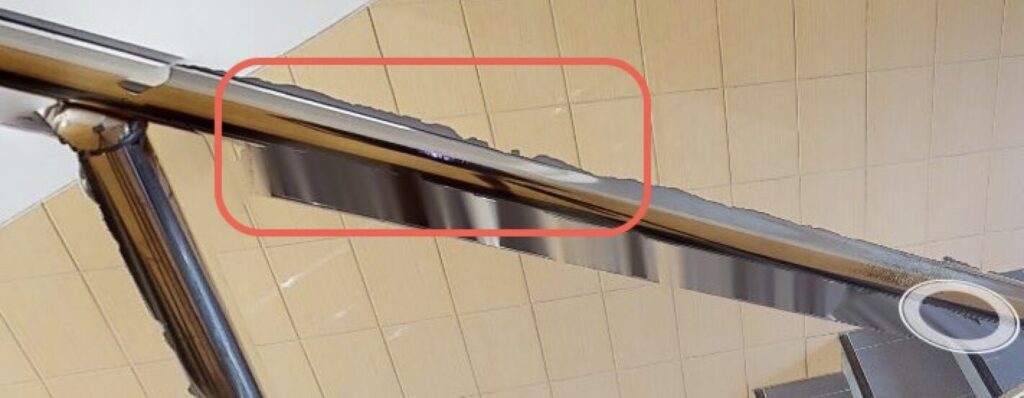
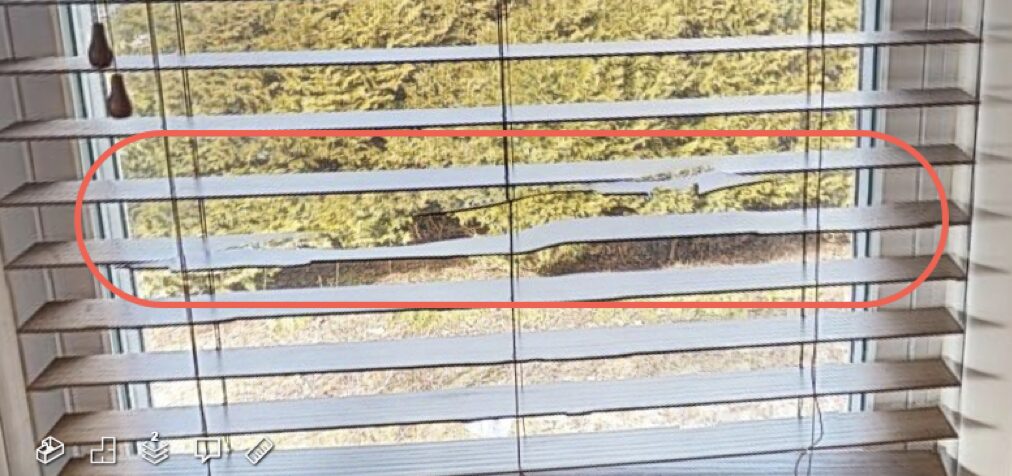
Jagged edges
There is a known issue with the Pro2 camera, where sometimes objects appear to have jagged edges or don’t line up properly. This is typically caused by the Pro2 camera being closer than 18″ from an object, or scanning lights, thin objects, edges of objects, and shiny black objects. Matterport’s pipeline uses depth data to align the 18 photos the camera takes at that location. When this issue occurs, the sensors in the camera weren’t able to create all of the mesh, so that when the photos are combined, pieces are missing. These can’t be repaired by our repair team because it’s not a misalignment. The presence of this issue doesn’t mean that there is anything wrong with the camera.
Outdoor Use:
The Matterport Pro2 3D camera is designed for indoor use. Outdoor scanning in 3D is conditional on direct sunlight & weather conditions. UV light interference causes errors, misalignment, and “holes” to appear. Dawn, dusk, and overcast are the best conditions for outdoor 3D scanning. If a 3D scan cannot be done, 360° panoramic views will be captured instead. If outdoor capture is mandatory for your project, the Leica BLK360 scanner, which is designed for large outdoor scanning projects, can be used at an additional cost TBD per project.
Site Preparation Checklist (Manglish Version)
SOP untuk Sediakan Ruang Sebelum Matterport 3D Scanning, 360 Photography atau Photoshoot Komersial
Kalau follow checklist ni, senang nak buat 3D scanning, 360 photography atau photoshoot komersial dengan lancar, pastu hasil pun cun, nampak realistik!
- Persiapan Asas
- Pastikan ruang bersih, kemas, tak serabut.
- Simpan barang peribadi, dokumen penting, atau barang berharga.
- Susun perabot dan dekorasi supaya nampak best.
- Ganti mentol lampu rosak supaya lighting sekata.
- Sembunyikan atau kemaskan wayar supaya tak serabut.
- Beritahu staff, penyewa, atau orang yang ada kat situ pasal shooting supaya tak kacau.
- Cahaya & Suasana
- Buka langsir dan tingkap kalau boleh bagi natural light masuk.
- Hidupkan semua lampu dalam bangunan untuk lighting sekata.
- Jangan campur cahaya panas & sejuk dalam satu ruang.
- Pastikan lampu luar dan signage berfungsi untuk tangkap gambar outdoor.
- Ruang Dalaman
- Ruang Tamu & Pejabat: Susun perabot elok-elok, jangan ada barang bersepah.
- Bilik Tidur & Ruang Peribadi: Katil kena kemas, barang peribadi jangan banyak sangat.
- Dapur & Pantry: Kosongkan countertop, simpan rak pinggan, susun barang elok.
- Bilik Air & Tandas: Bersihkan semua, susun toiletries kemas, tutup penutup toilet.
- Bilik Mesyuarat & Workspace: Susun kerusi meja elok, jangan ada bahan branding melampau (kalau tak perlu).
- Cermin & Permukaan Reflektif: Letak pokok tinggi atau objek depan cermin supaya kamera tak nampak dalam reflection.
- Elektronik: Matikan TV atau pasang satu logo statik kalau perlu.
- Ruang Luar & Outdoor
- Pastikan lanskap kemas (rumput potong, laluan bersih, tak ada sampah bersepah).
- Alih barang tak perlu (contoh: tong sampah, paip, alat pertukangan).
- Parking kena tersusun atau alih kereta kalau tak nak masuk dalam gambar.
- Pastikan lampu luar dan signage hidup kalau perlu.
- Ruang Event, Ballroom, Convention Centre & Exhibition Hall
- Setup Stage: Bersih dan susun pentas, podium, backdrop dengan betul.
- Susunan Tempat Duduk: Kerusi meja kena susun kemas dan simetri.
- Lampu & AV Equipment: Semua kena berfungsi elok.
- Signage & Branding: Susun banner, logo supaya jelas dan nampak cantik.
- Kosongkan Ruang: Jangan ada peralatan tak perlu.
- Lantai & Karpet: Vakum dan bersihkan kalau ada kotoran.
- Hiasan & Centrepiece: Susun bunga dan setting meja elok.
- Hotel Room & Ruang Hospitality
- Katil & Linen: Pastikan semua kemas, tak berkedut.
- Tingkap & Langsir: Buka tingkap biar cahaya masuk, tapi jaga exposure.
- Perabot & Dekorasi: Susun perabot simetri, jangan terlalu banyak hiasan.
- Bilik Air & Toiletries: Cermin, sinki bersih, tuala kena susun cantik.
- Minibar & Refreshments: Susun barang minibar, label kena menghadap depan.
- Balkoni & Pemandangan: Pastikan tak ada halangan, susun tempat duduk elok.
- Special Consideration untuk Matterport 3D Scanning
- Jangan ada benda bergerak (kipas, papan tanda berputar, binatang peliharaan).
- Buka pintu yang nak scan, tutup yang tak perlu.
- Inform orang supaya jangan lalu masa scanning.
- Matikan TV, projektor, LED screen, atau pause screen untuk elak flicker.
- Jangan alih barang masa scan untuk elak masalah alignment.
- Benda yang tak boleh alih akan kekal dalam model.
- Special Consideration untuk 360 Photography & Photoshoot Komersial
- Pilih focal point dan highlight feature penting.
- Letak props, dekorasi, atau branding yang sesuai.
- Kurangkan permukaan reflektif supaya kamera tak nampak dalam cermin.
- Kalau perlu, atur model atau staff dalam shot.
- Hari Shooting
- Sampai awal 30 minit untuk final check.
- Pastikan ada PIC untuk buka pintu dan assist.
- Semak balik ruang, confirm semua ready.
- Beri arahan terakhir sebelum shoot mula.
- Lepas Shooting
- Semak balik gambar atau scan untuk check kalau ada yang nak adjust.
- Berbincang pasal editing dan post-production kalau perlu.
- Matterport Pro2 Vs. Pro3
| Feature | Pro2 | Pro3 (latest) |
| Camera Type | Infrared | LiDAR / Improved HDR |
| Best For | Indoor 3D capture with high quality and resolution | Large indoor and outdoor spaces with higher precision |
| Sample Uses | Residential & Commercial Real Estate, Construction, Travel & Hospitality, Retail | Architecture, Engineering, Industrial Facilities, Large-scale 3D scanning |
Disclaimer Kamera Matterport Pro2
- Cermin: Kadang-kadang kamera Matterport boleh nampak dalam cermin sebab sistem dia “closed reality”. Tak boleh edit guna Photoshop.
- Jagged Edges: Ada satu isu yang biasa jadi dengan kamera Pro2, di mana kadang-kadang objek nampak macam ada tepi bergerigi atau tak selari betul. Selalunya ni jadi bila kamera Pro2 terlalu dekat dengan objek (kurang dari 18″), atau bila scan tempat cerah bercahaya, objek nipis, tepi objek, dan objek hitam berkilat. Sistem Matterport guna closed data untuk align 18 gambar yang kamera ambil kat satu lokasi. Bila isu ni berlaku, sensor dalam kamera tak dapat hasilkan semua 3D mesh, jadi bila gambar digabungkan, ada bahagian yang hilang. Benda ni tak boleh repair sebab bukan masalah alignment. Tapi jangan risau, ni bukan bermaksud kamera rosak.
- keadaan cahaya (dawn, dusk, overcast lebih baik). Kalau perlu scan luar, boleh guna Pro 3